Zapier vs Make vs n8n: Which Automation Tool Is Best in 2026?
Choosing between Zapier, Make, and n8n is not really about picking the most popular automation platform. It is about picking the one that matches the way you...
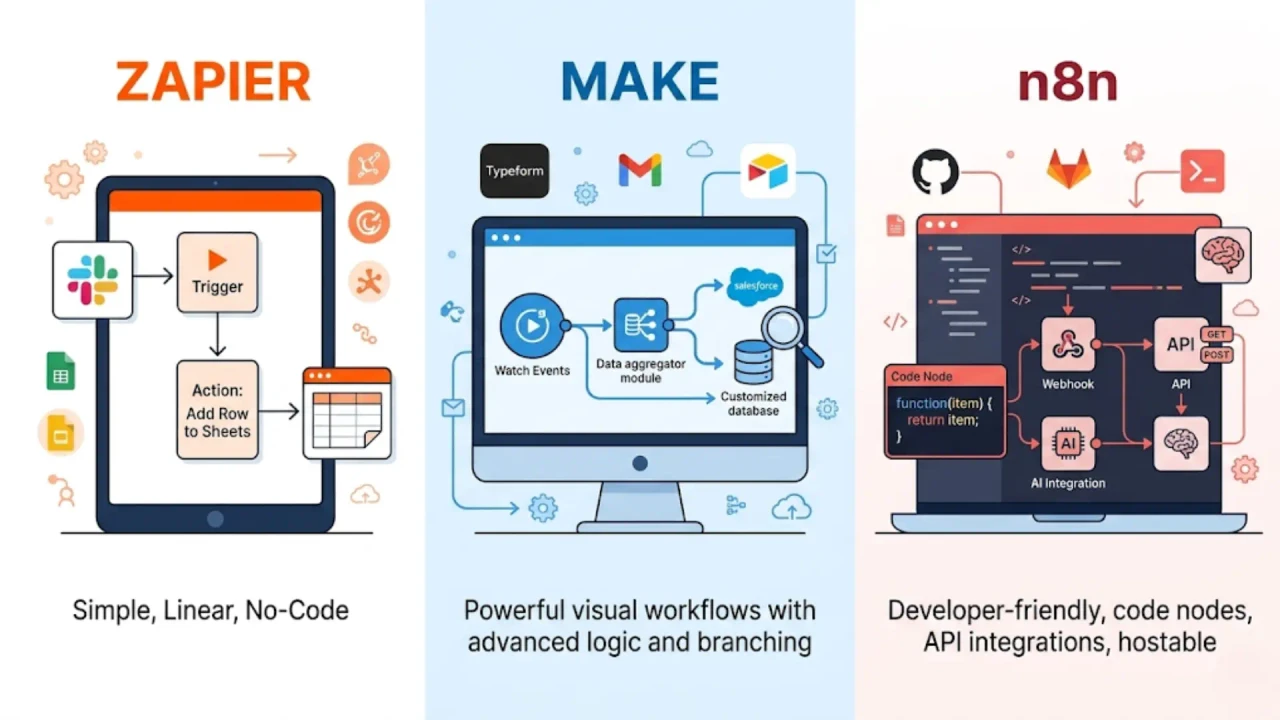
If you are comparing Zapier vs Make vs n8n in 2026, you are not choosing between three nearly identical automation tools. You are choosing between three very different ways to build systems.
Zapier is the easiest place to start. Make is the best visual workflow builder once things get more complex. n8n gives you the most control if you are technical and care about flexibility, custom logic, or self-hosting. That core split is still true in 2026, but the reason this decision matters more now is that these tools are no longer just connecting apps. They are all moving into AI workflows, agents, and deeper orchestration. Zapier now positions itself as an AI orchestration platform across 8,000+ apps. Make markets itself as visual-first AI-powered automation across 3,000+ apps. n8n positions itself for technical teams with code steps, custom API requests, self-hosting options, and execution-based pricing.
That is why the wrong choice hurts later, not on day one. A simple lead-routing automation may feel easy in any platform. But once you add enrichment, branching logic, approvals, AI summarization, retries, internal tools, and cost pressure, the differences become obvious. The best automation tool in 2026 is not the one with the nicest homepage. It is the one whose pricing model, workflow model, and learning curve still make sense after your automations become important.
Zapier vs Make vs n8n comparison table
| Tool | Best for | Pricing model | Learning curve | Self-hosting |
| Zapier | Beginners, small businesses, fast setup | Task-based | Easy | No |
| Make | Ops teams, agencies, visual workflow builders | Credit-based | Moderate | No |
| n8n | Developers, technical startups, custom systems | Execution-based | Steep | Yes |
The table above reflects the vendors’ current public positioning and pricing models: Zapier bills around tasks, Make bills around credits for module actions, and n8n bills around workflow executions regardless of complexity. Zapier publicly lists 8,000+ apps, Make lists 3,000+ apps, and n8n says all plans include every integration plus unlimited users and workflows.
Best automation tool for beginners, operations teams, and developers
Here is the short answer.
Choose Zapier if your team is non-technical and wants the fastest path from “we should automate this” to “it already works.” Zapier’s biggest strength is that it removes friction. Its pricing page still centers around multi-step Zaps, and its help docs make clear that a Zap is a trigger plus one or more actions, with successful actions consuming tasks while triggers do not.
Choose Make if your workflows are growing beyond basic automation and you want to actually see how the system works. Make’s public pricing page defines a credit as a module action in a scenario and highlights its visual workflow builder, routers and filters, and app ecosystem. In plain English, it is the tool for people who want more workflow power without jumping straight into engineering territory.
Choose n8n if you want control more than convenience. n8n’s pricing page says all plans include unlimited users, workflows, and every integration, with pricing based on monthly workflow executions regardless of complexity. Its public plan details also call out JavaScript/Python code steps, custom API requests, and a self-hosted Community Edition.
Real workflow example: how Zapier, Make, and n8n handle the same automation
This is the section most comparison posts skip, and it is where the real differences show up.
Let’s say a new lead fills out a form on your website. You want to:
- enrich the lead using Apollo or a Clearbit-style enrichment API,
- fetch the company website content,
- summarize that company with ChatGPT,
- send a formatted Slack alert to sales,
- and log the lead in your CRM.
This is not a weird enterprise use case. It is a very normal modern sales automation.
How Zapier handles this workflow
In Zapier, this is usually a very clean linear Zap.
The experience is excellent when the workflow is straightforward. Trigger from the form, enrich the lead, pass the website content to an AI step, post to Slack, update the CRM, and you are done. Zapier’s strength is that this setup is fast and approachable. It also has the broadest mainstream app coverage, which is why it remains the safest recommendation for non-technical teams using common SaaS tools. Zapier’s public pages say it supports 8,000+ apps, and its pricing docs define a task as every time a Zap successfully completes an action. Triggers do not count.
But here is the tradeoff: Zapier gets expensive when successful actions pile up. In this example, the countable cost is driven by the actions after the trigger. Zapier’s docs also note that some built-in tools such as Filter, Formatter, and Paths do not count as tasks, which is a nice detail, but the third-party actions still do. So if your lead workflow has four billable actions after the trigger, you pay for four actions every time it runs.
My blunt take: Zapier is the iPhone of automation. It is polished, fast, easy to recommend, and very good at making complexity disappear. But once automation becomes a core operating system for your business, the pricing model starts to matter a lot more than the onboarding experience.
How Make handles this workflow
In Make, the same workflow becomes a visual scenario.
This is where Make starts to make sense for operators, consultants, RevOps teams, and agencies. Instead of hiding the logic, Make puts it on a canvas. You can see the enrichment step, the website fetch, the AI step, the Slack action, the CRM update, and the branches between them. Make’s current pricing page defines each module action in a scenario as a credit, and the free tier includes 1,000 credits per month, 3,000+ apps, plus routers and filters. The paid Make plan starts at $9/month for 5,000 credits on the public pricing page.
That visual model is a real advantage once things get messy. If the AI summary fails, you can route the workflow to a fallback Slack alert. If the enrichment API returns incomplete data, you can branch to manual review. If you want to add a scoring rule before sending the lead to sales, the whole thing is visible. Make even advertises AI features and a code app for custom JavaScript or Python on its pricing page, though it notes that code execution uses extra credits.
My hot take: Make is beautiful until you build a monster. A 10-step scenario feels amazing. A 50-step scenario can start to look like a bowl of spaghetti unless you are disciplined about naming, grouping, and documentation.
How n8n handles this workflow
In n8n, the same automation becomes a workflow execution.
This is the moment where technical teams usually perk up. n8n’s pricing page says the platform bills by workflow executions regardless of complexity, and its Starter plan includes 2.5K workflow executions with unlimited steps for 20€ per month billed annually. All plans include unlimited users, workflows, and every integration. The public pricing page also lists developer-friendly capabilities such as code steps in JS/Python, custom API requests, and webhooks.
That means the same lead workflow that could create multiple billable actions elsewhere may still count as one execution in n8n. You also get far more control over the workflow itself. Need to custom-format the Slack payload with JavaScript? Easy. Need to hit a private internal API? Fine. Need to self-host because your legal or security team is allergic to sending sensitive workflow data through a third-party SaaS stack? n8n supports that too, though its own docs warn that self-hosting requires real technical knowledge around servers, scaling, security, and configuration. n8n explicitly recommends self-hosting for expert users and says mistakes can cause downtime, data loss, or security problems.
My blunt take: If “JSON payload” and “webhook” sound scary, do not start with n8n. It is powerful, but it assumes more from you. The upside is freedom. The downside is that you actually have to know what you are doing.
Zapier vs Make pricing vs n8n pricing: what happens at scale
This is where the decision becomes painfully obvious.
Zapier’s public pricing page lists the Professional plan from $19.99/month billed annually, and it explains that when you hit your plan limit, Zapier can move you to pay-per-task billing at 1.25x the base task cost. Make’s public pricing page lists a free plan with 1,000 credits/month and a Make plan from $9/month for 5,000 credits. n8n’s public pricing page lists Starter at 20€/month billed annually for 2.5K executions with unlimited steps, and Pro at 50€/month billed annually with a custom number of executions.
Now here is the simplified math that most buyers actually need.
Imagine you process 10,000 leads per month through a workflow with four billable actions after the trigger.
- Zapier: roughly 40,000 billable tasks
- Make: roughly 40,000 billable credits
- n8n: 10,000 executions
That math is an inference based on each vendor’s billing model, not a quote from their pricing page, but it is exactly why pricing structure matters more than entry-level sticker price. In a short, simple workflow, Zapier’s ease may be worth the premium. In a complex, repeat-heavy workflow, n8n’s execution-based model can be dramatically more economical. Make usually sits in the middle: more transparent and flexible than Zapier, less opinionated and less infra-heavy than n8n.
Zapier review: easiest automation tool with the biggest app ecosystem
Zapier remains the best choice for teams that value speed, simplicity, and coverage.
What it does well:
- huge app ecosystem,
- very fast setup,
- approachable for non-technical users,
- clean UX,
- strong fit for standard business automations.
What to watch out for:
- task-based costs add up quickly,
- less enjoyable than Make for deeply branched workflows,
- less flexible than n8n for custom logic or internal tooling.
A subtle but important nuance: Zapier’s pricing and help docs say some built-in workflow helpers such as Filter, Formatter, and Paths do not count as tasks, which softens the cost a bit for simple logic. Also, Zapier Agents usage is measured separately from Zap tasks, so if you evaluate the AI side of the product, do not assume everything is billed the same way.
Make review: best visual workflow automation tool for growing teams
Make is the strongest middle ground.
What it does well:
- visual builder that makes complex workflows easier to reason about,
- good balance of power and usability,
- strong routing and branching,
- cheaper entry point than Zapier on the public pricing page,
- good fit for ops teams, agencies, and consultants.
What to watch out for:
- credit usage can still climb fast,
- very large scenarios can get visually messy,
- less beginner-friendly than Zapier.
One expert detail worth knowing: Make’s pricing page now highlights AI tooling, AI agents, and a code app, but it also notes that code execution consumes extra credits. That means Make is not just “cheap Zapier.” It is better to think of it as a more visual, more operational platform where workflow design matters a lot.
n8n review: best self-hosted automation tool for developers
n8n is the highest-upside choice if you are technical.
What it does well:
- execution-based pricing,
- unlimited users, workflows, and integrations on public plans,
- code steps, custom API requests, and webhooks,
- self-hosting options,
- strong fit for custom systems and AI-heavy workflows.
What to watch out for:
- steepest learning curve,
- self-hosting is not beginner-friendly,
- more responsibility falls on your team.
There is also one licensing detail many articles get wrong. n8n makes its source code available and offers a self-hosted Community Edition, but its docs say the product uses the Sustainable Use License and the fair-code model, which includes commercial restrictions. So it is fairer to call n8n source-available and self-hostable than to casually label it “traditional open source.”
Which automation tool is best for AI workflows in 2026?
All three tools now want to be part of your AI stack, but they approach that goal differently.
Zapier is turning AI into a convenience layer for business teams. Its homepage and AI pages push AI workflows, agents, chatbots, and orchestration across 8,000+ apps. That makes it appealing if you want to add AI to the business apps you already use without rebuilding your stack.
Make’s current public pages frame AI as visual orchestration. It highlights AI apps, AI agents, and a visual-first platform that can connect those systems across thousands of apps. That is attractive if you want to see how your AI logic, fallback paths, and downstream actions fit together.
n8n is the most interesting option for technical AI workflows because it combines AI steps with code, APIs, webhooks, and self-hosting. Its AI agents page explicitly emphasizes production-ready AI agents and practical workflows, which is a better fit for teams that care about control, debugging, and infrastructure choices.
Final verdict: which automation tool should you choose?
If you want the simplest answer, here it is.
Choose Zapier if automation is mostly a productivity layer. You want quick wins, a polished UX, and the highest chance your app stack already connects without extra work.
Choose Make if automation is becoming an operational system. You want branching logic, visibility, and a workflow builder that shows you what is happening instead of hiding it.
Choose n8n if automation is part of your product, platform, or technical advantage. You want custom logic, execution-based economics, and the option to self-host or build around your own architecture.
My honest ranking is not one universal leaderboard. It is this:
- Best for beginners: Zapier
- Best for visual workflow automation: Make
- Best for developers and scale economics: n8n
That is the decision. Not which logo you like most. Not which pricing page looks cheapest at first glance. Which tool still makes sense once your workflows become important.
FAQ: Zapier vs Make vs n8n
Is Zapier better than Make?
Zapier is better for beginners and fast setup. Make is better for more complex visual workflows. If your team is non-technical and values speed, Zapier usually wins. If you want more branching, routing, and workflow visibility, Make is usually the better fit.
Is Make cheaper than Zapier?
At entry level, Make’s public pricing starts lower. But the real answer depends on how many module actions your workflows consume. Zapier charges around tasks, Make charges around credits, and both can scale up quickly as workflows grow.
Is n8n cheaper than Zapier?
For complex, multi-step workflows, often yes. n8n’s public pricing is based on workflow executions regardless of complexity, which can be much more economical than paying for many separate billable actions in a task-based system.
Is n8n open source?
Not in the strict OSI-approved sense. n8n’s docs describe its model as fair-code under the Sustainable Use License, with source code available and commercial restrictions in place.
What is the best Zapier alternative in 2026?
For most buyers, the best Zapier alternatives are Make and n8n. Make is the better choice if you want visual workflow power without much engineering overhead. n8n is the better choice if you want technical control, self-hosting, or lower costs for logic-heavy automations.
Continue reading more practical guides on the blog.